When AI is providing real-time support via WhatsApp or WebBot, it’s possible to initiate specific flows to take actions such as tagging the lead, automatically transferring the lead to someone, and more.
This is possible by combining the use of a “Processed Rule/Answered Rule” type flow with an AI-Trigger automation rule.
For the trigger to work, the following requirements must be met:
1. The rule must be named AI-Trigger.
2. The rule action must be “Flow.”
3. The flow to be triggered must be specified in the “Flow” option.
4. The rule’s text/response must contain the conditions for the rule to be triggered.
There are two possible formats for the rule’s text/response. One is a simple text rule where you simply list the conditions for the rule to be met. Example:
1. The customer requested a quote.
2. The customer provided an email address for sending the quote.
3. The customer provided a contact phone number.
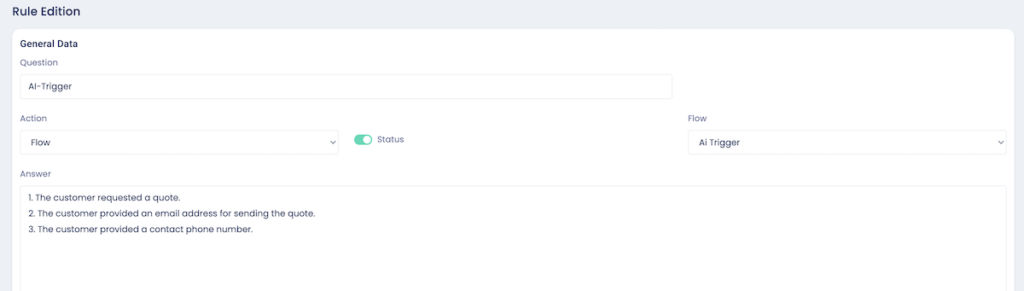
In the above case, the rule will be triggered if the conversation with the AI contains all the information that is a condition for triggering the rule.
The other format for the text/response is more complex, but also much more useful because it allows the AI to associate information with identifiers that can be used in the flow. In this case, we need a JSON with the following structure:
{“condition”: { “question”: “Question for the AI that validates the rule trigger” }, “identifiers”: [ { “name”: “identifier-name”, “question”: “Question you ask the AI that will fill in the identifier value” }, { “name”: “another-identifier-name”, “question”: “Question you ask the AI that will fill in the value of the other identifier” }, … other identifiers and questions ] }
Here is an example:
{
    "condition": {
        "question": "Considering the conversation with the lead, do we already know what type of property the customer is looking for and what the price range is? IMPORTANT: answer only with YES or NO, without any other text or explanation."
    },
    "identifiers": [
        {
            "name": "property-type",
            "question": "What type of property is the client looking for? IMPORTANT: answer only with one of the following types: house, apartment, townhouse, or other. Without any other text or explanation."
        },
        {
            "name": "price-range",
            "question": "What price range is the client willing to pay for the property? IMPORTANT: answer only with one of the following price ranges: below 50,000, 50,000 to 100,000, 101,000 to 200,000, 201,000 to 500,000, above 500,000. Do not add any other text or explanation."
        }
    ]
}
For this text/response, the rule will do the following:
1. Ask the AI if it already knows the type of property and the price the client is willing to pay. The answer to this “condition” question must always be YES or NO to trigger (or not trigger) the rule. In fact, the rule is only triggered if the answer is YES. Any other answer from the AI will not trigger it.
2. If the answer is YES, the AI will fill in the identifiers with the values that are the result of the questions for each identifier. It works as if you had asked the question in the flow; that is, afterwards, you can use the identifiers to retrieve the information. Example: $PROPERTY-TYPE will return the type of property, and $PRICE-RANGE will return the price range.